Firmware Flashing Instructions
Host Connection Instructions
Core Connection Limitation
The Fly-D8 mainboard can only communicate with the host via the Type-C USB interface for Klipper.
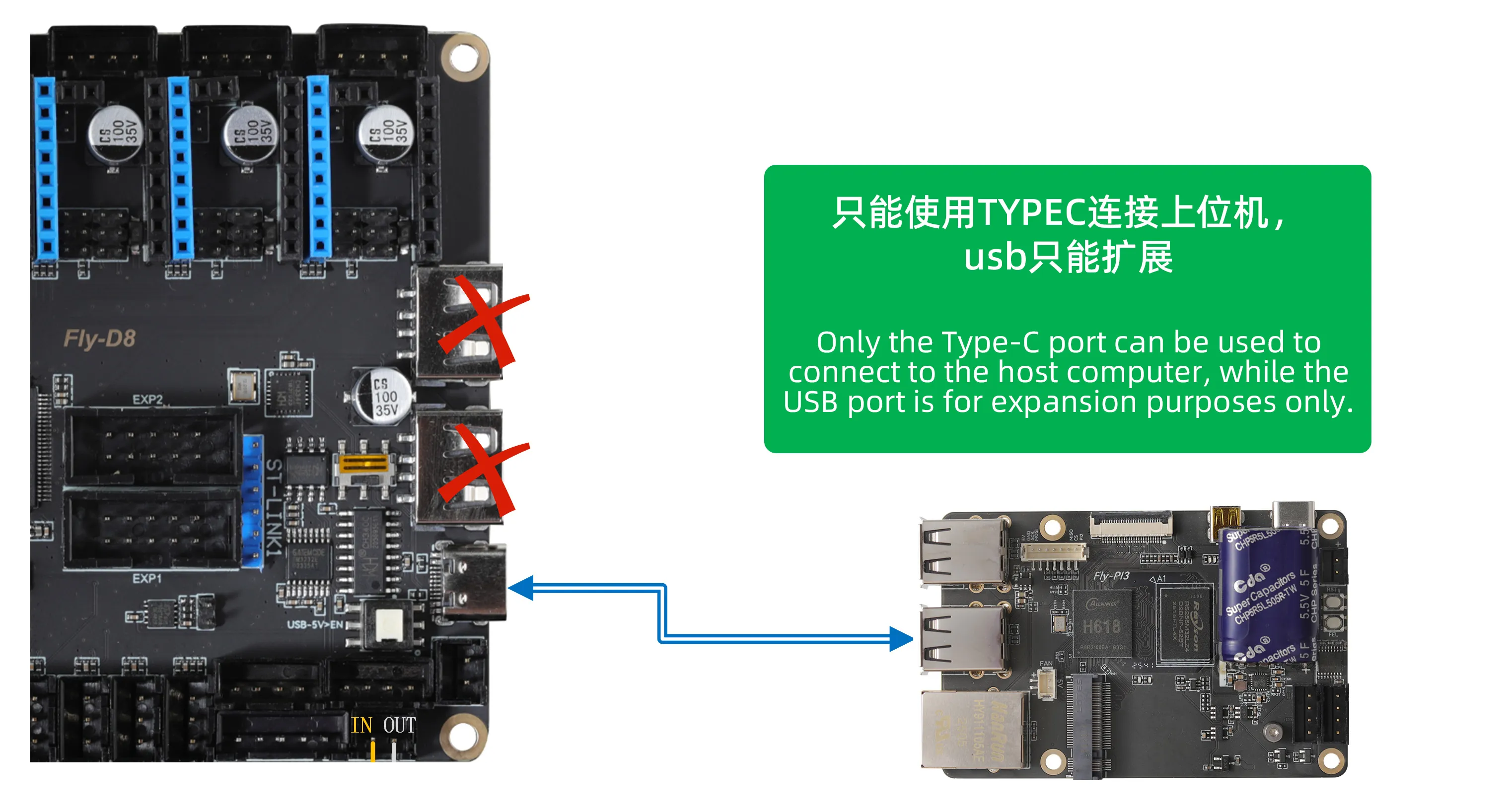
Connection Requirements:
- Use a high-quality Type-C data cable to ensure stable data transmission.
- It is recommended to avoid using excessively long data cables (not exceeding 1.5 meters).
- Connect to a standard USB-A port on the host computer.
How to Determine Which Firmware You Need
warning
- Note: As long as you are not using a CAN toolboard, you must choose the
USB firmware!!! - When using a CAN toolboard, the mainboard needs to be flashed with the
CAN bridge firmware. - Using an RS232 toolboard does not require flashing any firmware on the mainboard, but the corresponding toolboard needs to be flashed with RS232 firmware.
-
USB Firmware
- Advantages: The most common connection method in 3D printers, reliable and stable communication.
- Disadvantages: Multiple USB devices may affect data transmission.
-
USB Bridge Firmware
- Advantages: Can connect multiple devices simultaneously without occupying a USB port. Only required when using a CAN toolboard.
- Disadvantages: The initial firmware compilation and flashing process can be more cumbersome.
Loading...